Xpansion candidates
Parameters
Name
string Specifies the name of the investment candidates. Antares Xpansion uses this name in the output and the logs.
Warning
This field must not contain spaces!
Link
string Defines the link of the Antares study candidate for investment, whose capacities (direct and indirect) will be modified by Antares Xpansion. The syntax of the link name includes the names of the two Antares nodes that are connected by the link, separated by "-", for example:
origin_area - destination_area
Annual cost per mw (€/MW/year)
float The decimal separator is the point. It defines the fixed cost annuity of the investment candidate. Depending on the type of candidate, the fixed cost annuity can include:
- Fixed operation and maintenance costs,
- An investment cost annuity.
Max investment (MW)
float Represents the candidate's potential, i.e. the maximum capacity that can be invested in this candidate. If this parameter is set, the invested capacity can take any value in the interval [0, max-investment].
Unit size (MW)
float Defines the nominal capacity of the investment candidate's units.
Max units
int Corresponds to the candidate's potential in terms of number of installable units. If the parameters max-units and unit-size are set, then the invested capacity is necessarily a multiple of unit-size from the set:
Warning
The definition of an investment candidate must necessarily include either (i) a maximum potential in MW (max-investment) or (ii) a unit size in MW (unit-size) and a maximum potential in number of units (max-units).
Already installed capacity (MW)
float Corresponds to a capacity that is already installed on the investment candidate's link. If Antares Xpansion finds that the investment in this candidate is economically relevant, the new capacity will be added to the already installed capacity. The transmission capacities initially indicated in the Antares study are not considered in the already-installed-capacity parameter and are overwritten by Antares Xpansion.
(In)direct link profile
string Specifies the name of a file. It must contain at least one column of 8760 numerical values. Multiple columns are used in order to use different data depending on the Monte-Carlo year in process, see details here. When only one column is specified, the same profile is used by Antares Xpansion for all Monte-Carlo years of the Antares study and all assessed capacities.
Note
Both files direct-link-profile and indirect-link-profile must contain the same number of columns.
The (in)direct-link-profile makes the link between the invested capacity and the capacity that is actually available, in the (in)direct directions of the Antares link, for the 8760 hours of the year. More details are given in this section.
The (in)direct-link-profile can be used for example to represent the maintenance of a generation asset via a seasonalized power outage, or the average load factor of intermittent renewable generation, defined at hourly intervals.
File user/expansion/candidates.ini:
[1]
name = pv
link = area1 - pv
annual-cost-per-mw = 46000
max-investment = 1000
already-installed-capacity = 50
direct-link-profile = capa_pv.csv
indirect-direct-link-profile = capa_pv.csv
already-installed-direct-link-profile = direct_installed_capa_pv.csv
already-installed-indirect-link-profile = indirect_installed_capa_pv.csv
Note
You can import a the link profiles in the Xpansion > Capacities tab of Antares Web. Containing load factor profile in the Antares Xpansion format. Each 8760 value column represent the profile for a complete year and can be affected to a Monte-Carlo year with the scenario builder. If you don't care about scenario you can define only one column.
Already installed (in)direct link profile
string
Specifies the name of a file. This file must be located in the
user/expansion/capa/ directory of the Antares study and has the same format
as a (in)direct-link-profile file. The already-installed-(in)direct-link-profile
makes the link between the already installed capacity and the available
capacity, in the direct and indirect way of the Antares link, for the 8760
hours of the year. More details are given in
this section.
Note
The same file can be used for (in)direct-link-profile and already-installed-(in)direct-link-profile of one or more candidates.
Link between invested capacity and capacity of the Antares study
Note
For simplicity, we often refer to [already-installed]-direct-link-profile and [already-installed]-indirect-link-profile link profiles as just [already-installed]-link-profile in the sequel.
The parameters link-profile, already-installed-capacity and already-installed-link-profile are used to define the link between the capacity installed by Antares Xpansion, the already installed capacity and the truly available capacity in the Antares study, hour by hour and in both directions of the link, following the relationship presented in Figure 6.
By default, the link-profile and already-installed-link-profile contain only 1's, thus assuming perfect availability of the invested capacity.
The parameters link-profile and already-installed-link-profile are conventionally used to:
-
Take into account an NTC profile on an interconnection, possibly seasonalized and having a different impact on the direct and indirect directions of the link. It is possible to specify a different NTC profile for each Monte-Carlo year.
-
Represent the maintenance of a thermal generation asset by considering a reduction of its power, possibly different according to the season (see Figure 7),
-
Model renewable generation by multiplying the invested capacities by a load factor chronicle (e.g. an average chronicle or the chronicles of some Monte-Carlo years).
If you use the average availability, to validate the results after running the Antares Xpansion, it is preferable to re-simulate these outages according to a stochastic process by relaunching an Antares simulation with the capacities obtained by Antares Xpansion in order to obtain the real production program with outages and RES intermittence varying according to the scenarios.
Using different profiles depending on the Monte-Carlo year
From Antares-Simulator 8.2, users can define different NTC chronicles for different Monte-Carlo years. Briefly, users define any number of chronicles for each link. For each link, users can select (randomly or not) one of the said chronicles in a result we call scenario. Refer to Antares Simulator documentation for more information.
In Antares Xpansion, it is possible to use those scenarios to select a different link profile depending on the Monte-Carlo year. There are a few pre-requisites:
- For a given candidate, if specified, direct-link-profile, indirect-link-profile, already-installed-direct-link-profile and already-installed-indirect-link-profile must have the same number of columns.
- For a given link in the Antares-Simulator study, the number of columns for NTC chronicles must be the same as in the link profiles and already installed profiles for the candidates on this link.
- It is possible not to provide a link profile or already installed profile. A profile with a value of 1 is used whichever Monte-Carlo year is chosen.
Examples of candidates
Basic example
An example with two investments candidates, one in semi-base generation and one in network capacity, is given below.
The invested semi-base generation in area1 is shifted in the virtual node
invest_semibase. During the optimization process, the capacity of the
link between area1 and invest_semibase will be updated with the new
invested capacity.
The candidates.ini file for this example is the following one:
[1]
name = semibase
link = area1 - invest_semibase
annual-cost-per-mw = 126000
unit-size = 200
max-units = 5
already_installed_capacity = 200

[2]
name = grid
link = area1 - area2
annual-cost-per-mw = 3000
unit-size = 500
max-units = 4
Another example with solar generation in a virtual node:
[1]
name = solar_power
link = area1 - pv1
annual-cost-per-mw = 100000
max-investment = 10000
direct-link-profile = pv1.txt
indirect-link-profile = pv1.txt
pv1.txt is a text file, located in the user/expansion/capa/ folder
of the study, and which contains the load factor time series of the
candidate. When \x\ MW of the candidate solar_power are invested, the
actual time series of available power is equal to the product of \x\ and
the time series pv1.txt.
Several investment candidates on the same link
The same link in an Antares study can be the support of several investment candidates. The interest of such an approach can be:
- To define several potentials with different fixed cost annuities,
- To define several investment opportunities of different unit size.
Example
For example, for an investment in photo in photovoltaic production with three potentials of increasing cost.
[1]
name = pv_fr_1
link = fr - pv_fr
annual-cost-per-mw = 50000
max-investment = 2000
link-profile = profil_pv.txt

[2]
name = pv_fr_2
link = fr - pv_fr
annual-cost-per-mw = 100000
max-investment = 2000
link-profile = profil_pv.txt

[3]
name = pv_fr_3
link = fr - pv_fr
annual-cost-per-mw = 200000
max-investment = 1000
link-profile = profil_pv.txt
This is equivalent to:
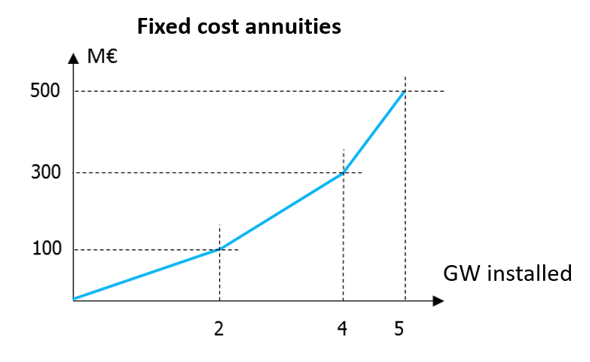
This only works with the Antares Xpansion algorithm (Benders decomposition) if the costs are increasing and if the investment candidates with the same link have the same already-installed-capacity and already-installed-link-profile.
Decommissioning candidates
In this example, we show how to consider both an investment candidate and a decommissioning candidate on the same link. Candidates for decommissioning must be moved from their physical location to a virtual node as explained in Prepare the Antares study.
We strongly advise to explicitly specify candidates for decommissioning in the name field of the candidates.ini file (although this is not required by the tool). This will ease the analysis of Antares Xpansion output for the user.
By considering several investment candidates on the same link, it is possible to model both an investment and a decommissioning candidate.
-
The candidate for decommissioning is defined by:
- A decommissionable capacity, that corresponds to a max-investment or max-units \(\times\) unit-size.
- Fixed operation and maintenance costs (no investment cost) given in the field annual-cost-per-mw.
-
The candidate for investment is defined as by:
- An expandable capacity, that corresponds to a max-investment or max-units \(\times\) unit-size.
- A fixed-cost annuity that includes investment costs and fixed operation and maintenance costs given in the field annual-cost-per-mw.
[1]
name = fr_ccg_decommissioning
link = fr - fr_ccg              # Link between the node France and the thermal cluster CCG
annual-cost-per-mw = 36000      # Fixed annual operation and maintenance costs
unit-size = 330
max-units = 19                  # Thermal cluster CCG currently installed

[2]
name = fr_ccg_investment
link = fr - fr_ccg
annual-cost-per-mw = 126000     # Fixed annual operation and maintenance costs + annualized investment costs
unit-size = 330
max-units = 50                  # New potential of buildable CCG
Warning
The hourly availability time series of thermal generation CCG in Antares should be higher than the sum of currently installed and new potential buildable capacities (availability of CCG cluster in the virtual node \(\mathrm{fr}_{ccg} > 330 \cdot 19 + 330 \cdot 50\) in this example).
Note
If the user specifies an already-installed-capacity for the decommissioning candidate, this capacity will not be decommissioned by Antares Xpansion.
From the modelling of decommissioning candidates, it follows that the final result should be read "in the opposite way" compared to investment candidates:
- If the result displayed in the console for fr_ccg_decommissioning is 300 x 19 MW invested, this means that no unit is decommissioned.
- If the result displayed in the console for fr_ccg_decommissioning is 0 MW invested, this means that all units have been decommissioned.